You can use a Select Statement to find data in any field, including those that are not available in Search Fields. You can use Select Statement searching to find records where data is missing from a field, making this a useful tool when doing data clean-up.
To run a Select Statement:
1.Open Advanced Search and choose Select Statement as your search method.
2.Construct your Select Statement:
This example searches for records where the Artist/Maker is recorded as Jane Smith.
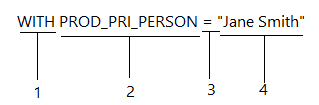
1. Select statements start with the word "with" or "without", to find records that either do, or do not contain the specified data.
2. The second part is the internal field name of the field you want to search on. You can find the internal field name by clicking into the field, and then pressing Alt+F1 or go to Help > Database Information. The internal field name will be listed at the bottom of the Database Information window. Ignore the FMC number in brackets.
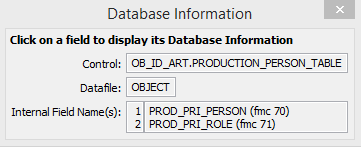
Database information window for the Artist/Maker field
If the field is part of a table, there will be multiple internal field names listed. They will be listed in the order (left to right) that columns appear in the table.
3. Part three is the search operator. Some common search operators for Select Statements are:
= |
Equal to |
< |
Less than |
> |
Greater than |
] |
Starting with |
[ |
Ending with |
[] |
Containing |
You can also use the words FROM and TO, e.g. WITH CLASSIFICATION_DATE FROM "01 Jun 2015" TO "30 Jun 2015". To combine statements, use the word AMD, e.g. WITH CLASSIFICATION_DATE FROM "01 Jun 2015" TO "30 Jun 2015" AND WITH CATALOGUER = "Bil Vernon".
4. Part four is what you are searching for, contained inside quotation marks. In this example we are searching for the name "Jane Smith".
3. Press Next, and then Finish to see your results.
