A Field Usage Count shows statistical information on:
othe overall number of fields in a datafile.
othe number of fields in use.
othe field and the number of records using this field.
othe total number of records in the file.
Run a Field Usage Count
1.Go to Tools menu > Utilities > Field Usage Count.
2.Choose a datafile to run the report on in the File Name field.
3.If you want to limit the report to a saved list of records, specify this in the List Name field.
4.If you want to report on unused fields or fields that have no data, check the Show Unused Fields checkbox.
5.Click OK to run the report.
The time required to generate this report depends on the number of records.
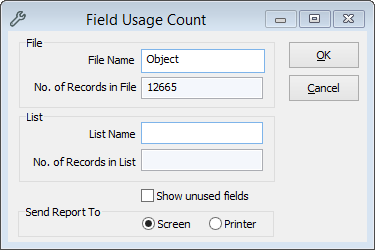
Field Usage Count Window for Object
