WHAT IT'S USED FOR:
The Next Higher Record in Group field identifies the group record that the object you are viewing at the moment belongs to.
When documenting Objects that are made up of multiple independent parts, record data about the group as a whole, and then link this to the various subordinate or member objects, as in the Library and Archive File/Item data entry windows.
Vernon CMS allows the creation of a group object record, which contains the common data relevant to the group as a whole, as well as linkages to the individual member or subordinate records which make up the group.
For example, for an album containing 50 photographs, you might wish to record information about the album itself, e.g. its size and condition, subject matter, historical significance of the collection. In addition, you may wish to record the size and condition, photographer, and subject matter of each of the photographs.
You may not want to repeat the general information about the album against each of the photographs individually. Instead, you can create a group object record (i.e. for the album), as well as individual records for each member object (i.e. for each photograph), and link these to each other.
Remember you are recording Group & Member details of the current object (i.e. of the object you are viewing on screen at the moment).
Therefore, you are using these fields:
oto record the group object of the current object if it has one. If the current object is itself the top of the hierarchy, the Next Higher Record in Group field will be empty.
oto record the Level of the current object
oto record Notes about the current object
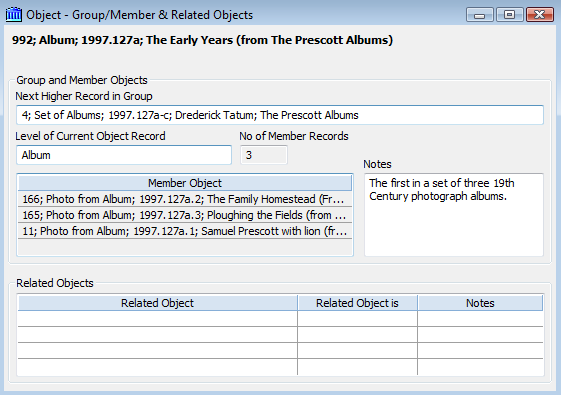
For example, in the sample shown above, the object record being viewed is the Photo Album "The Early Years", one of a set of three albums, and its Level is "Album". The Next Higher Record in Group of this album is the record for the set of albums (i.e. "The Prescott Albums" would have the "Set of Albums" type). Member objects (which are recorded automatically by the system) are the various photographs in the album. If you were to retrieve each of these records, they would each have the "Photo from Album" type.
Other types of records that may benefit from use of the Group/Member fields are:
oa portfolio of prints
oarchival material (group, series, paper, etc.)
oconceptual groups such as an issue of stamps
When NOT to use the Group/Member facility
It is not usually appropriate to use the Group/Member facility for sets with multiple parts when those parts are not fully functional objects in their own right. For example you would not use this facility when the photographs in an album could not, or should not, be removed from the album for independent display, study, loan or if the album itself was insignificant.
Nor would you use it for sets such as playing cards, dinner sets, silver services. Objects of this nature are usually created as single objects with multiple parts. The Group/Member facility caters specifically for objects that can function individually, OR as part of a set (e.g. a single print from a portfolio of prints) if the significant item is composed of other significant items.
It is also NOT necessary to use the Group/Member fields to associate objects which merely have the same attributes, e.g. the same donor, classification, department or materials. These objects can already be easily retrieved and sorted based on these common attributes, and no additional grouping is required.
Hierarchical Relationship
The relationship between Group and Member objects is hierarchical, and functions just like a hierarchical authority file. The Next Higher Record in Group field is the same as Next Higher Term, and the adjacent Level field is the same as Hierarchical Level. You can define group and member objects to any level.
For example, for a set of three photo albums you might create a group object record describing the three albums as a unit, e.g. 'The Prescott Albums' (with the 'Superior Group' type). This object would have no Next Higher Record in Group or Next Higher Term, because it is itself the highest term.
You might then create one record for each of the 3 separate albums, and each of these would show the superior group record (e.g. The Prescott Albums) as their group object record or Next Higher Term. Finally, you would create individual records for each of the photographs. These individual records would each have one of the 3 photo albums as their Next Higher Term.
A hierarchical structure is one which links items to one another in an ascending/descending classifies arrangement of any number of levels. Hierarchies have the following attributes:
oeach item can have only one parent (i.e. belong to one group)
oany group can have any number of members (children).
In Vernon CMS there is no limit to the number of levels that you can have within an hierarchical structure.
WHERE TO FIND IT:
The standard Group Member & Related Objects window, and the Archive and Library windows.
RETRIEVAL:
Full instructions for retrieving objects from the system are covered in the section on Retrieving Data.
The Next Higher Record in Group is an indexed field. You can search for objects based on their group object by selecting Next Higher Record in Group from among the available search fields in the Query window, and proceeding as you would when searching any authority controlled field.
REPORTING:
Full instructions for creating reports to view on screen or send to a printer are covered in the section on Reporting.
Display
To display this field in either Down the Page or Across the Page reports, simply select Next Higher Record in Group from the list of available display fields.
It is suggested that you become familiar with the way authority controlled fields function during the reporting process.
Sorting
You can sort the objects in your report by Next Higher Record in Group. Simply select the field from the list of available sort fields.
